

Writers today face many distractions that can derail productivity and impact the writing process. With so many websites, apps, notifications, and rabbit holes competing for our attention, it can be challenging to focus and make progress on writing projects. Fortunately, Google Chrome offers some handy extensions that can help writers take control of their environment, build better habits, and optimize their workflows.
In this post, I’ll highlight four of my favorite Chrome extensions for improving focus, tracking time, limiting distractions, and catching errors during the writing process. Whether you struggle with procrastination, losing time to research tangents, or just need help enforcing good writing habits, these tools can help you manage your online time and energy more effectively. Read on to learn how StayFocusd, WebTime Tracker, Unhooked, and Grammarly make me a more productive and proficient writer.
1. StayFocusd
StayFocusd is a Chrome extension that helps people stay focused on work by blocking or limiting access to distracting websites. Some of the ways StayFocusd helps keep me on my writing task include:
- Block distracting websites – Writers can use StayFocusd to block time-wasting sites like social media, news, YouTube, etc. during writing time. This removes distractions.
- Set writing time limits – StayFocusd allows setting daily time limits for websites. Writers can use this to define writing goals and limit time on non-writing sites.
- Focus during writing sessions – With distracting sites blocked, writers can get into a flow state and avoid wasting time toggling between apps/sites.
- Limit Internet research – The blocking features can also limit time spent going down research rabbit holes online, keeping writers focused.
- Prevent procrastination – StayFocusd is useful for procrastinators – blocking sites makes it harder to procrastinate on writing work.
- Set nuclear option for writing – The “nuclear option” blocks all sites except a whitelist. Writers can whitelist only writing apps/sites to force focus. Combine it with the Pomodoro Technique for extra focus.
StayFocusd gives writers more control over their environment and habits to minimize distractions and stay focused on writing. For me, it’s an indispensable productivity tool. I use it to block social media, news sites, and online retail, but you can personalize it for your own biggest time sucks.
2. WebTime Tracker
WebTime Tracker is a Chrome extension that tracks how much time you spend on websites and applications. I find it helpful to track my time especially when doing background research for writing projects. Its key features for writers include:
- Track time spent writing – The extension can track time spent in word processors/writing apps to help writers know how much actual writing they are getting done each day.
- Identify productive writing times – The productivity reports can show writers when their peak writing times are based on when they have longer writing sessions. This allows for optimizing schedules.
- Track research time – Time spent researching and gathering material can also be tracked separately from writing time to analyze efficiency.
- Analyze habits – Writers can look at usage trends to see if they are procrastinating, identify what steals their time, and adjust their habits accordingly.
WebTime Tracker aims to make you more aware of how you spend time online so you can focus on being productive and minimize distractions.
3. Unhook
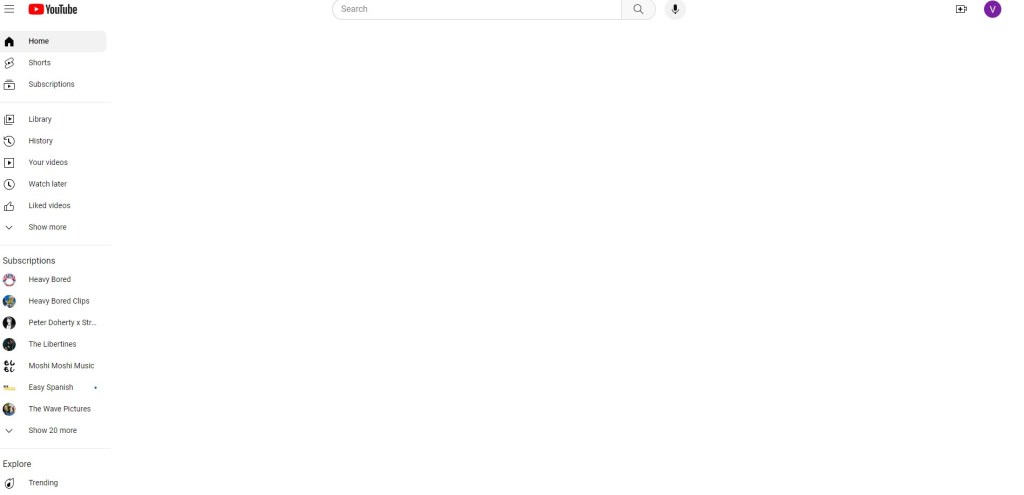
Unhook is a plugin that works with YouTube that I only recently discovered. I was reluctant to use Stayfocusd to set limits on YouTube because I used it for exercise and medication, but kept getting stuck in video rabbit holes. The website works hard on its algorithms to keep us users on the site, after all. Unhooked is my way to fight back. With this plugin, I only use YouTube for what I need. Here’s how it works:
- While on YouTube, Unhook hides related videos, comments, shorts tab, suggestions, homepage recommendations, and other distractions.
- When you navigate to the YouTube homepage, you no longer see dozens of videos that may be unrelated to the content you went there to view. Instead, you see only your subscription sidebar and the search function.
- After you watch a video, Unhooked prevents Autoplay and hides the recommended video feature, allowing you to move on to your next task.
Unhook has made it easy for me to use YouTube only for what I need and then get back to my writing. Its settings are easy to customize, so you can block only the YouTube features that are most distracting for you.
4. Grammarly
You’ve probably seen the ads. Grammarly is a popular Chrome extension that provides grammar, spelling, and punctuation checking. Since I’ve started using Grammarly, I’ve had fewer typos in my work than relying on built-in spell checkers alone. Grammarly can do all the following, and more:
- Catch grammar/spelling errors – Grammarly’s real-time checks identify writing mistakes as you type, allowing writers to catch and correct issues early.
- Enforce style rules – The extension can be customized to check for style guide rules on aspects like punctuation, capitalization, passive voice, etc.
- Improve clarity – Grammarly provides readability scores and suggestions to help writers make their work more clear and concise.
- Perfect tone – Grammarly provides tone adjustments for making writing more formal, casual, or business-appropriate.
- Save time editing – By handling basic editing tasks like grammar and spelling checks, Grammarly allows writers to focus their efforts on higher-level content improvement.
The internet presents both opportunities and obstacles for writers today. While it offers useful research materials, it also enables infinite distractions. Using extensions like StayFocusd, WebTime Tracker, Unhooked, and Grammarly, writers can control their online environment to minimize distractions and optimize their use of time.
Give these tools a try to become more focused, aware of your habits, and productive with your writing. Install one or all four to block distractions, track your time, limit YouTube, and catch errors. With the help of these Chrome extensions, you can build the habits and environment for writing success.
Let me know in the comments which extension sounds most useful for your workflow. And if you have any other recommended Chrome tools for writers, please share! I’m always looking to further optimize my process.



 Narrative with Valerie Lute